Inquiry
Form loading...

How to Choose the Best Leafless Desktop Fan?

A Leafless Desktop Fan can look like a simple upgrade: compact, modern, and easier to wipe than a fan with exposed blades. Yet appearance alone says little about comfort. A small fan may suit a desk beside a laptop, while a larger room or warm afternoon may call for stronger airflow. Noise matters, too. A faint motor hum can feel distracting during calls or quiet work.

This guide explains how to compare airflow, noise, size, controls, cleaning needs, and energy use before choosing a model. It also covers practical details, such as whether the fan fits beside a monitor and whether its base stays steady when buttons are pressed. Check product specifications, but treat broad claims about “quiet” operation with care; sound can seem different across rooms and settings. Not every model performs alike. A bladeless design can reduce contact with exposed fan blades, but it still contains internal moving parts and needs sensible care. There is no perfect pick for every desk. A feature-rich model may cost more without making your workspace noticeably cooler. The right choice depends on your space, habits, and expectations—and it is worth admitting that a neat design does not guarantee better comfort.
How to Choose the Best Leafless Desktop Fan?

Identify Your Airflow Needs and Compare CFM Ratings Tested to ANSI/AMCA 210

Before comparing a leafless desktop fan, picture where the air needs to go. A fan beside a keyboard may need a narrow stream across your hands. One on a bedside table may need gentler airflow that reaches your face without stirring papers. Measure the distance from the fan to your usual seat, and note whether nearby walls or monitors block the path. Small details matter.

CFM means cubic feet per minute, a measure of airflow volume. A higher rating can indicate more air moved, but it does not guarantee a stronger breeze at your desk. Compare figures tested under the same conditions, and look for documentation stating that testing followed ANSI/AMCA 210. This standard describes laboratory methods for measuring fan performance. If a listing gives a CFM number without its test method or operating speed, treat it cautiously. The comparison may be incomplete.

Check airflow at the setting you would actually use, not only the maximum. A phone app cannot replace controlled testing, but it can help you compare perceived noise in the same room. Notice whether the breeze reaches your hands evenly or fades before crossing the desk. CFM figures can look precise while leaving out comfort. That is worth questioning. A short return period can help, since published ratings may not predict how airflow feels beside your own monitor.

How to Choose the Best Leafless Desktop Fan?

Compare a fan’s airflow rating with the space and air movement you need.

These are calculated airflow targets for 5 air changes per hour in rooms with 8-foot ceilings—not measured fan results. The estimate uses CFM = room area × ceiling height × air changes per hour ÷ 60. When comparing fans, look for airflow ratings tested using ANSI/AMCA 210 and consider your preferred noise level and desk distance.

Compare Fan Noise in dB(A) Using IEC 60704-2-7 Test Methods

How to Choose the Best Leafless Desktop Fan?

Compare Fan Noise in dB(A) Using IEC 60704-2-7 Test Methods

A quiet fan should be judged under comparable conditions, not by a number printed without context. IEC 60704-2-7 provides particular test methods for measuring noise from fans, alongside the applicable general test requirements. Look for a report that names the test standard, operating mode, and A-weighted result. A phone app beside your desk can offer a rough impression, but it is not a substitute for a controlled test.

Check whether the published figure is sound power or sound pressure. Sound power describes the noise emitted by the fan under test conditions; sound pressure depends on distance, room surfaces, and microphone position. Comparing two sound-pressure readings only makes sense when those details match. The A-weighting also reflects how people perceive sound across frequencies, though it cannot describe every tonal quality. Listen closely.

For a useful comparison, check readings at the same fan speed and compare the same type of measurement. A low dB(A) figure may still hide a thin whine or pulsing hum that becomes noticeable in a quiet bedroom. Test conditions matter, and real rooms are imperfect. If possible, listen from your usual seating distance, with the fan on the setting you actually use. Numbers narrow the choice; your ears help finish it.

Evaluate Energy Use in Watts and Calculate Airflow Efficiency in CFM/W

When comparing leafless desktop fans, check power draw and airflow at the same speed setting. A fan’s wattage can change between low, medium, and high, so one number may not describe everyday use. Small details matter. A plug-in energy meter can show how many watts the fan uses while running on your desk.

Airflow efficiency is calculated by dividing airflow in cubic feet per minute (CFM) by power in watts. For example, 240 CFM at 30 watts equals 8 CFM/W. Compare figures measured under similar conditions; published maximum airflow may not reflect what reaches your chair from two feet away. The ratio is useful, but incomplete. A fan with a higher CFM/W may still feel weak if its total airflow is low. Check the setting behind each figure, and note whether oscillation was on. At a quiet evening setting, a modest fan may use little power yet leave warm air lingering around a laptop. That practical gap is easy to miss in a specification table.

Check Electrical Safety and Construction Against UL 507 Requirements

When choosing a leafless desktop fan, treat its smooth shell as appearance, not proof of safety. UL 507, the Standard for Electric Fans, sets requirements for fan construction and electrical safety. Check for a model-specific certification mark from a qualified testing laboratory, then verify the model number in its online directory. Inspect the power cord, plug, housing, and joints for damage or gaps. Small details matter. A pinched cord or loose plug can be easy to overlook.

NFPA’s Home Electrical Fires report, using 2015–2019 data, estimated an annual average of 46,700 home fires involving electrical failure or malfunction, with 390 civilian deaths. These figures are not fan-specific, but they show why electrical checks matter. Compare the fan’s voltage and wattage label with the product instructions and your outlet. During a supervised test, watch for unusual heat, a burning smell, rattling, or intermittent power. Stop using it if anything seems wrong. I would not assume a bladeless design is safer just because its moving parts are less visible; certification details can take effort to verify.

Match Fan Footprint, Controls, and Cleaning Needs to Your Desk Setup

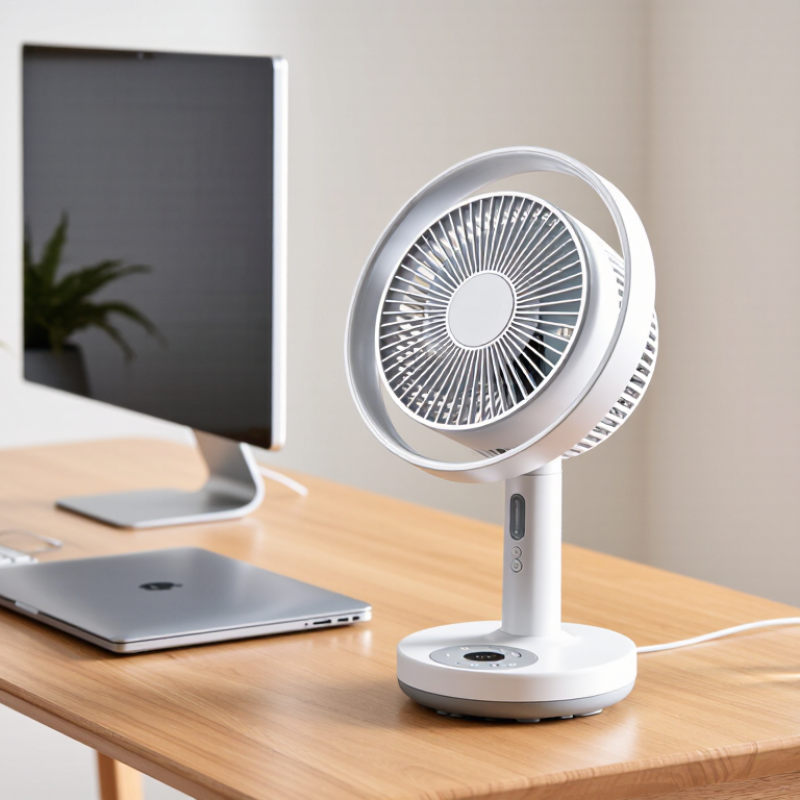
A leafless desktop fan should fit the desk, not compete with your keyboard. Measure the clear space beside your monitor and note where cables, a mug, or a notebook usually sit. A slim base may save room, but a tall unit can block a screen or feel unstable near a desk edge. OSHA’s Computer Workstations eTool recommends arranging equipment to support comfortable posture and easy reach. Keep the fan within reach without crowding your mouse.

Controls matter during long work sessions. The ASHRAE Global Thermal Comfort Database II contains 81,846 comfort records from 23 countries. That range reflects how differently people experience airflow and temperature. Choose settings you can adjust easily from your chair, such as a reachable speed control or timer. A remote is useful, but it can disappear under papers. Small annoyance, real one.

Cleaning access is part of the fit. Look for openings and smooth surfaces you can reach with a cloth, rather than narrow seams that trap dust. Check whether the intake and outlet can be cleaned without awkward tools, and follow the care instructions. A compact fan may look tidy yet take longer to clean. That trade-off is easy to miss. Allow space around the unit so you can wipe it down without moving half your desk.