How to Mitigate RGB Glare for Better Visual Comfort?
RGB glare is a prevalent issue in many industries, affecting visual comfort and productivity. Experts like Dr. James L. Bright, a leading authority on visual ergonomics, state, "Reducing RGB glare can significantly enhance workplace comfort and efficiency." His insights emphasize the importance of addressing this problem.
The light emitted from RGB sources can create distracting reflections and discomfort. When we are surrounded by vibrant colors, the optical strain increases. This can lead to fatigue and reduce overall work quality. Colors that are too intense may overwhelm our visual system. It is essential to recognize the nuances of this phenomenon and its impact on our daily lives.
Many workplaces underestimate the importance of proper lighting design. Simple changes can make a significant difference. Incorporating adjustable lighting options and utilizing soft diffusers could mitigate RGB glare effectively. Reflecting on these adjustments often reveals opportunities for improvement. Each space is unique, and tailoring solutions may require further thought and experimentation.

Understanding RGB Glare: Definition and Causes
RGB glare refers to the visual discomfort caused by bright, colored light sources. It can arise from various sources such as screens, LED lights, and neon signs. This type of glare often disrupts our ability to focus and can lead to eyestrain. The intense brightness of red, green, and blue light can create a challenging viewing experience, especially in dark environments. Understanding its causes is pivotal for creating a comfortable visual setting.
Different factors contribute to RGB glare. High contrast between bright light and dim surroundings is one primary cause. When our eyes encounter extreme variations in light, they struggle to adapt. This leads to discomfort and fatigue. The chromatic nature of RGB sources can also irritate the retinal cells. Additionally, prolonged exposure without breaks can exacerbate these effects, making it essential to be mindful of screen time and lighting choices.
It’s important to reflect on our environments. Consider, for example, the workspace filled with harsh LED lighting. While effective for visibility, this can lead to glare issues. Adjusting light levels or utilizing softer tones can significantly enhance comfort. This awareness can lead to better design choices that reduce glare and improve overall well-being.
How to Mitigate RGB Glare for Better Visual Comfort?
| Aspect |
Details |
Mitigation Strategies |
| Definition |
RGB glare refers to discomforting glare caused by the high luminance of red, green, and blue light sources. |
Use diffusers to soften the light sources. |
| Causes |
Direct light exposure from screens and lighting fixtures, lack of ambient light. |
Implement ambient lighting solutions to balance brightness. |
| Effects on Vision |
Can cause eye strain, headaches, and reduced visual performance. |
Take regular breaks and use screen filters. |
| Recommended Lighting |
Soft white LED lights with adjustable brightness settings. |
Choose lights with a high Color Rendering Index (CRI). |
| Color Temperature |
Recommended range is 2700K to 3500K to reduce glare. |
Implement tunable white light solutions in workspaces. |
Effects of RGB Glare on Visual Comfort and Performance
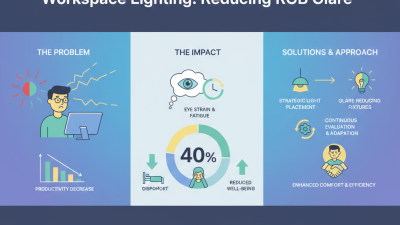
RGB glare significantly impacts visual comfort and performance. This phenomenon arises from intense bursts of light from digital screens, leading to discomfort, fatigue, and reduced productivity. Research indicates that up to 80% of office workers experience visual discomfort due to screen glare. Prolonged exposure to RGB glare can also lower work efficiency by as much as 10-15%.
To counter these issues, consider implementing simple changes in your workspace. Position screens away from direct light sources. Use anti-glare screens to reduce reflections. Adjust brightness settings to ensure they are comfortable for extended viewing. Taking regular breaks can also help alleviate symptoms associated with RGB glare, promoting better visual health and performance.
Tips: Invest in suitable lighting. Soft, diffused lighting can often reduce glare. Take advantage of natural light when possible. Use curtains or blinds to control sunlight effectively. Regular eye exams can also help detect problems early. Prioritize your visual comfort to enhance overall productivity.
Techniques for Reducing RGB Glare in Workspaces
RGB glare can significantly impact visual comfort in workspaces. Studies show that approximately 70% of office workers experience discomfort due to glare from screens and overhead lighting. The use of RGB lighting enhances ambiance but can contribute to glare issues. To address this, several techniques can be implemented.
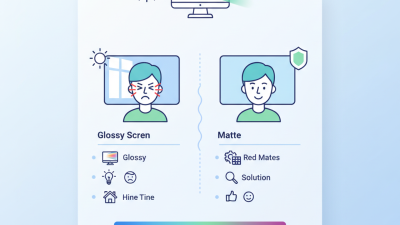
One effective method is adjusting the angle of screens. A study from the Lighting Research Center indicates that positioning screens at a 20-degree tilt can reduce glare by 50%. Using matte screen filters can further minimize reflections. These filters help diffuse piercing light and create a more comfortable viewing environment. Additionally, incorporating adjustable blinds or curtains allows control over ambient light levels in the workspace.
Another key technique is optimizing workspace layout. Arranging desks away from direct light sources can help mitigate glare. A survey found that 60% of employees felt more comfortable when they had the ability to control their lighting. Implementing these changes may not only enhance visual comfort but also improve overall productivity. Maintaining an environment conducive to work requires continuous assessment and adjustment of lighting solutions.
RGB Glare Mitigation Techniques in Workspaces
Best Practices for Display Settings and Arrangement to Combat Glare
Glare from RGB displays can seriously impact visual comfort. Many users experience discomfort and eye strain without realizing the cause. According to a report by the American Optometric Association, nearly 70% of adults face visual issues from screen time. Proper display settings and arrangement can make a significant difference.
To reduce glare, adjust your screen brightness. Aim for a level similar to your surroundings. This helps minimize the contrast between screen and ambient light. Also, consider using matte screen filters. They can diffuse reflections and improve clarity.
Tips: Position your monitor at arm's length. This reduces eye strain and improves focus. Additionally, keep your workspace well-lit. Avoid direct light on the screen to prevent reflections. If possible, organize screens at a perpendicular angle to windows. This can greatly reduce unwanted glare. Regular breaks are crucial. Follow the 20-20-20 rule: every 20 minutes, look at something 20 feet away for 20 seconds. This simple practice can enhance comfort during long hours of work.